Free GTM Container Audit — 85 Rules, 10 Categories, Instant Results
Upload your Google Tag Manager container export and get a health score, consent compliance check, GA4 validation, dead code detection, and a prioritized work plan. Everything runs in your browser — your file never leaves your machine.
A free, browser-based GTM container auditor
Export your container JSON, upload it, and get a health score, category breakdowns, and prioritized findings in seconds. No sign up, no cost, privacy-first.
Every finding includes the severity, the affected tags, and a specific fix — organized into a work plan so you know what to tackle first.
Category Scores
Three steps to a healthier container
Export your container
In GTM, go to Admin then Export Container then choose your workspace. You'll get a JSON file.
Upload to TagManifest
Drop the file onto tagmanifest.com. Analysis runs in your browser and completes in seconds.
Review and export
Get your health score, category breakdowns, and prioritized findings. Export in six formats.
Ten categories of container health
Each category checks a different dimension of your GTM container. Here's what TagManifest looks for — and what the findings look like.
Consent and Compliance
13 rulesCMP detection, Consent Mode v2 configuration, consent initialization timing, ad_storage and ad_user_data coverage across all tags, Digital Markets Act readiness, and GA4 consent type validation. Surfaces whether your consent setup is legally compliant or just cosmetically present.
GA4 Data Quality
16 rulesEvent naming conventions, the 40-character name limit, the 25-parameter limit, reserved event names, PII in parameter names, reserved prefix usage, debug mode, measurement ID hardcoding, Enhanced Measurement conflicts, and ecommerce event validation.
Ecommerce Tracking
5 rulesSend Ecommerce Data toggle, required purchase parameters (transaction_id, value, currency), purchase events on page-load triggers, and ecommerce funnel coverage. The category that diagnoses $0 revenue in GA4.
sendEcommerceData is offAdvertising
9 rulesConversion Linker presence, conversion tag trigger types, remarketing tag configuration, Google Ads and Floodlight setup, and ad platform consent coverage. Catches the attribution and conversion tracking issues that silently waste ad spend.
Security and PII
6 ruleseval() usage, innerHTML assignment, HTTP resource loading, Base64 encoding patterns, direct document.cookie access, and GA4 parameters with PII-suggesting names. Identifies security and privacy patterns for review.
Performance
4 rulesjQuery dependencies in Custom HTML, document.write() usage, All Pages triggers with URL-specific code, and innerHTML assignments. Estimates how your GTM container affects page load speed based on static analysis of tags, scripts, and execution patterns.
Dead Code
6 rulesLegacy Universal Analytics references — __utmz cookies, _gat._getTrackers(), _gaq.push(), ga('send') calls — plus stale paused tags and potentially dead domain references. Finds the code that's been running against null values since the UA sunset in July 2023.
Organization
8 rulesFolder usage, orphaned triggers and variables, default tag names, and container structure. Measures whether the container is self-documenting — could a competent person who's never seen it get productive in 30 minutes?
Infrastructure
8 rulesDuplicate scripts, Custom HTML tags that could be native templates, tag sequencing issues, and external resource management. Finds the structural inefficiencies that accumulate as containers grow through multiple agency handoffs.
Naming
8 rulesConvention consistency, separator patterns, variable type prefixes, GA4 parameter formatting, and default name detection. Naming is the most visible signal of container maintainability — mixed conventions from multiple agencies are immediately apparent.
GA4 - Purchase EventdashFB | Pixel BasepipeCJS: Helper UtilcolonBuilt for the person who just inherited a GTM container
You just inherited a container
The previous person left and didn't document anything. You need to understand what's in here, what patterns exist, and where to focus first. TagManifest gives you that orientation in under a minute.
You're a consultant scoping work
Export the container, scan it, and walk into the kickoff call with a health score, a prioritized issue list, and specific findings you can discuss. Turn a container you've never seen into a proposal-ready assessment.
You're using AI to improve GTM
Export the audit as narrative markdown or an MCP server file and feed it directly to Claude, ChatGPT, or any AI assistant. Structured findings with specific issues, affected tags, and recommendations — instead of raw container JSON.
You need to verify consent compliance
European traffic, GDPR requirements, and you're not sure if your consent setup actually works. TagManifest checks for CMP detection, Consent Mode v2 wiring, ad_storage and ad_user_data coverage, DMA readiness, and consent initialization timing.
It's your data, it should stay that way
We built TagManifest to be a simple, privacy-first auditor. Everything runs locally in your browser — your container file is parsed and analyzed in JavaScript on your machine. Nothing is sent to a server. No analytics on your container contents. No account required.
Don't take our word for it — open your browser's network tab before uploading a file. The only requests are for page assets. Your data stays with you.
See it in action
Don't want to upload your own container yet? Try a sample audit to see how the dashboard works, what findings look like, and how the scoring and export system operates.
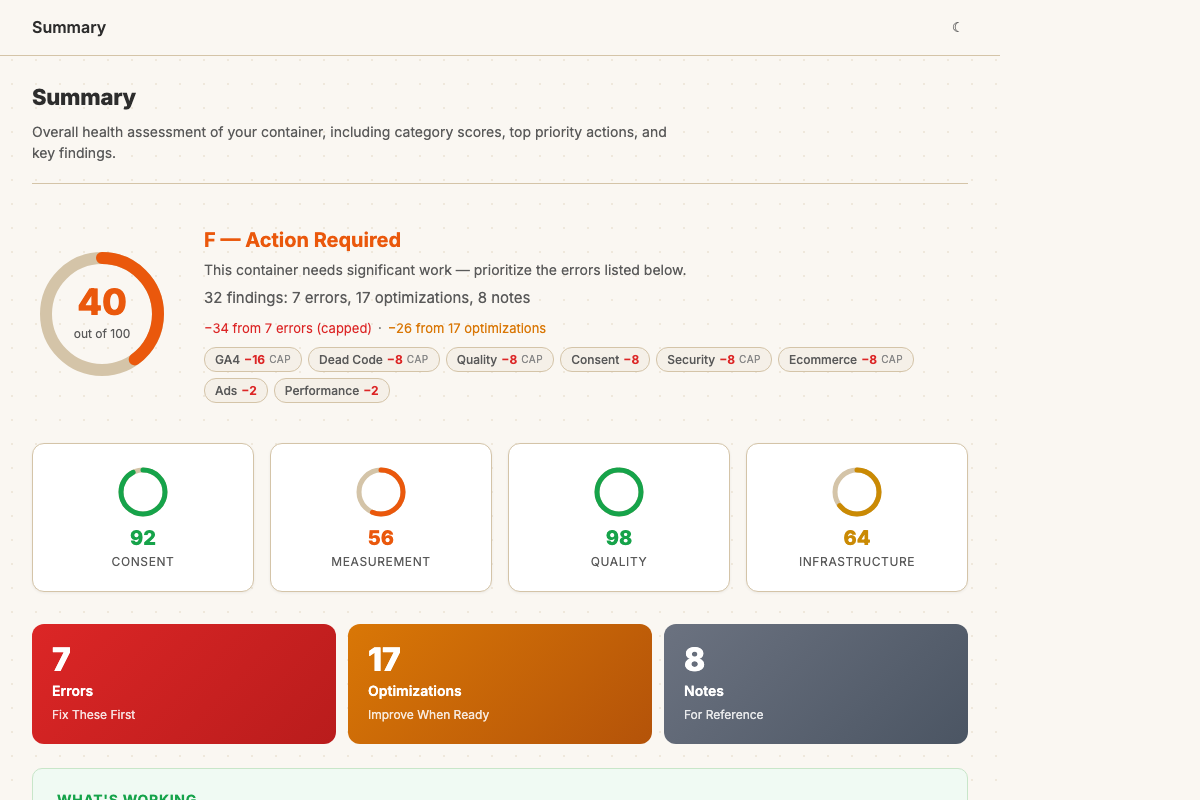
Sample audit of a fictional "BargainBin Direct" container — 32 findings across 7 errors, 17 optimizations, and 8 notes. Scores 40/100 with deductions in GA4, dead code, consent, and security.
Common questions
A JSON export of your Google Tag Manager container. In GTM, go to Admin → Export Container → choose your workspace → download. The file is typically named GTM-XXXXXX_workspace.json.
Yes. Completely free with no paid tier, no usage limits, and no account required. Upload your container, get your report, export it — as many times as you want.
Your container file is parsed and audited entirely in your browser using client-side JavaScript. No data is uploaded to any server. You can verify this in your browser’s network tab.
85 rules across 10 categories: consent and compliance, GA4 data quality, advertising, ecommerce, security and PII, performance, dead code, organization, infrastructure, and naming conventions.
TagManifest produces two views. The functional health score runs from 0 to 100 and reflects configuration quality: data accuracy, consent setup, conversion tracking, and code patterns. The container hygiene profile rates naming consistency, folder organization, variable health, and trigger cleanliness as Clean, Mixed, or Cluttered — it tells you whether someone else could inherit this container and make sense of it. The distinction matters because the paths are different: a health finding means something is worth investigating now, a hygiene finding means it will matter as the container grows or changes hands.
Findings are organized into four effort tiers: quick wins you can fix in minutes, focused remediation for issues that need a session, structural work for architectural changes, and strategic improvements for long-term container health. Each finding includes a severity rating, the affected tags, and a specific recommendation.
Yes. 13 rules dedicated to consent: CMP detection, Consent Mode v2 configuration, ad_storage and ad_user_data coverage, ad_personalization for remarketing, DMA readiness, consent initialization timing, and consent type validation across all tags in the container.
Yes. 16 rules for GA4: event naming conventions, the 40-character name limit, the 25-parameter limit, reserved event names, PII in parameter names, reserved prefix usage, debug mode, measurement ID hardcoding, Enhanced Measurement conflicts, and ecommerce event validation.
Yes. The ecommerce category checks for the Send Ecommerce Data toggle (the most common cause of $0 revenue), missing required purchase parameters (transaction_id, value, currency), purchase events on page-load triggers, and incomplete funnel coverage.
Six formats: Word document (.docx) for stakeholders, narrative markdown report, detailed report with all evidence, CSV spreadsheet for ticket-by-ticket remediation, machine-readable JSON for automation, and an MCP server file for AI assistant integration. All exports are generated client-side.
Yes. Export the audit as narrative markdown (ideal for pasting into a chat) or as an MCP server file (for direct integration with AI tools that support Model Context Protocol). The structured findings — with rule IDs, severity ratings, affected items, and specific recommendations — give AI assistants concrete data to work from instead of raw container JSON.
Yes. Visit tagmanifest.com/demo to see a sample audit without uploading your own container. The demo shows a scored container with real findings across all categories.
Tag Assistant and GTM Preview Mode are runtime debugging tools — they show you what’s happening on a specific page in real time. TagManifest is static analysis of the entire container definition — it checks all 85 rules across every tag, trigger, and variable at once, without visiting any pages. They’re complementary: use TagManifest for the container-wide audit, Preview Mode for page-level debugging.
ObservePoint and DataTrue are enterprise monitoring platforms that cost $12,000–$18,000 per year and require ongoing access. TagManifest is a free, instant, one-time scan — upload a JSON file, get results in seconds, export and go. No subscription, no integration, no ongoing commitment.