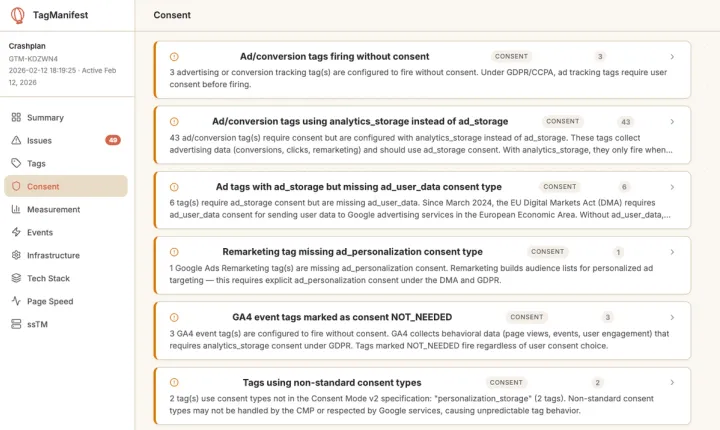
Why GTM consent compliance matters now
Consent compliance is now one of the most scrutinized parts of a GTM implementation. A misconfigured consent setup either:
- Exposes you to regulatory risk (tags firing without valid consent), or
- Silently erodes measurement (tags not firing when they should).
Most containers I audit have a consent banner and a CMP installed, but the integration between that banner and actual tag behavior is where things break. Since 2024, the bar has risen on both the platform and regulatory sides:
- Google’s DMA obligations mean Consent Mode v2 signals are required for EEA traffic. Without
ad_user_dataandad_personalization, Google reduces or disables conversion processing for European visitors. - GDPR enforcement has shifted toward technical audits. Regulators now look at whether data collection is technically blocked until consent, not just whether your policy claims it is.
- Authorities are also targeting dark patterns in consent flows: pre-checked boxes, hidden reject options, or designs that nudge users into accepting tracking.
The practical question has changed from “Do you have a consent banner?” to “Does your consent banner actually control what your tags do?”
How consent mode works in GTM
Consent Mode in GTM is driven by two commands that run at specific points in the page lifecycle:
consent_default– fires on page load and sets the initial consent state, typically denying all consent types before the user has made a choice. This must run before any other tags execute.consent_update– fires after the user interacts with the consent banner, updating GTM (and Google’s systems) with the visitor’s actual preferences.
These commands control four consent types that govern Google tags:
| Type | Controls | Added |
|--------------------|------------------------------------------------------------|-------|
| ad_storage | Advertising cookies (Google Ads, Floodlight, remarketing) | Original |
| analytics_storage| Analytics cookies (GA4 measurement) | Original |
| ad_user_data | Sending user data to Google for advertising purposes | v2 (2024) |
| ad_personalization | Personalized advertising and remarketing | v2 (2024) |
The v2 types, ad_user_data and ad_personalization, were introduced to meet DMA requirements. For sites with EEA traffic, they are mandatory if you want Google to fully process advertising-related conversions.
Basic vs advanced consent mode
Your implementation choice here affects both compliance posture and data coverage:
- Basic Consent Mode
- Tags do not fire at all until consent is granted.
- Binary on/off: no data for non-consenting users.
- Strong, simple compliance story but larger measurement gaps.
- Advanced Consent Mode
- Tags can fire in a cookieless state when consent is denied.
- Sends pings without setting cookies; Google uses modeling to recover an estimated 65–80% of conversions that would otherwise be lost.
- Better measurement, but some privacy advocates question whether cookieless pings are compatible with a strict interpretation of “no tracking after refusal.”
This is a policy decision your organization should make deliberately, not fall into by default.
The role of the CMP
Your consent management platform (CMP) sits between the user and GTM:
- The CMP collects the visitor’s choices via the banner.
- It then passes those choices to GTM via the Consent API or the data layer.
- When wired correctly, Google tags automatically respect consent states without extra triggers.
- When wired poorly, the banner becomes cosmetic while tags behave as if no consent framework exists.
What to check in your GTM container for consent
Below are the core checks I run in a GTM consent audit, ordered roughly by regulatory significance.
1. Is a CMP present and actually integrated?
First, confirm whether a CMP is present at all. If you serve EU/UK traffic and have no CMP, that’s the primary gap to fix.
More commonly, a CMP exists but isn’t properly integrated:
- A CMP tag/template is present, but
consent_defaultnever fires`. - GTM therefore has no initial consent state, and tags run in a consent-ambiguous state.
This is arguably worse than having no CMP: it creates a false sense of compliance while tags behave as if consent doesn’t exist.
2. Are advertising tags using the correct consent types?
This is the most frequent and highest-risk misconfiguration.
- Advertising tags (Google Ads, Floodlight, Microsoft UET, Facebook Pixel, etc.) should be gated behind
ad_storage, notanalytics_storage. - A user who allows analytics but denies advertising must not trigger ad conversion tags.
A real-world example:
- 44 ad tags (22 Google Ads conversions, 22 Microsoft UET events) were all configured with
analytics_storageinstead ofad_storage. - If a visitor denied ad tracking but allowed analytics, all 44 ad tags still fired.
- Intent was correct (they tried to use consent), but the consent type was wrong, creating direct regulatory exposure.
3. Are Consent Mode v2 signals configured?
For any tag that sends data to Google for advertising purposes, you now need:
ad_user_dataad_personalization
In many older containers:
- Tags use
ad_storageandanalytics_storagecorrectly. - But no v2 consent types are configured, because the implementation predates March 2024 and was never updated.
The result: conversion data for EEA visitors is not fully processed for ads, even if tags appear to fire normally.
4. Are any tags bypassing consent entirely?
Look for:
- Tags explicitly marked as
NOT_NEEDEDfor consent, or - Tags with no consent configuration at all.
These tags fire regardless of the user’s banner choice.
In the example container:
- 6 tags (3 Google Ads conversions, 3 GA4 events) bypassed consent entirely.
- They were likely added after the original consent setup by someone unaware of the consent framework.
These are high-priority to fix because they represent direct, unmitigated non-compliance.
5. Is CMP timing configured correctly?
Timing is subtle but important. Most CMPs expose a waitForUpdate (or similar) parameter that tells GTM how long to wait for the CMP’s consent decision before firing tags.
- If
waitForUpdateis 0ms or not set, GTM doesn’t wait. - Tags then make consent decisions before the CMP has applied the correct state.
Example impact:
- Cookiebot’s
waitForUpdatewas set to0ms. - GA4 did not send cookieless pings before consent (negating advanced mode’s benefits).
- ~8,000 organic sessions per month were misattributed as Direct.
A single parameter, a 5-minute fix, but over a year of skewed attribution.
6. Are third-party tags using consent at all?
Non-Google tags (Facebook, LinkedIn, TikTok, HubSpot, Hotjar, etc.) do not automatically respect GTM’s consent framework.
They require:
- Explicit blocking triggers based on consent state, or
- Consent-aware firing conditions.
Many containers:
- Correctly gate Google tags behind consent.
- But allow third-party tags to fire regardless, because implementers followed Google’s guides and assumed consent mode applied universally.
This creates a gap where your banner appears compliant, but major third-party trackers ignore user choices.
Quick fixes vs structural consent work
Consent issues tend to cluster into clear effort bands, which is useful for planning remediation.
| Priority | Fix | Effort |
|----------|--------------------------------------------------------------|------------------------|
| 1 | Fix CMP timing (e.g. set waitForUpdate to ~500ms) | ~5 minutes |
| 2 | Add consent requirements to tags currently marked NOT_NEEDED| ~15 minutes |
| 3 | Add missing v2 consent types to tags using ad_storage | ~30 minutes |
| 4 | Correct consent type mismatches (e.g. analytics_storage → ad_storage on ad tags) | Focused afternoon |
| 5 | Configure consent for all third-party tags | Afternoon to full day |
| 6 | Re-evaluate basic vs advanced consent mode | Strategic decision |
The underlying pattern is consent drift:
- A consultant or agency implements consent correctly.
- Over time, new tags are added by others who don’t fully understand the framework.
- Standards change (e.g. Consent Mode v2), but the container isn’t updated.
No one does anything malicious; the environment moves and the container doesn’t.
In the example container:
- 44 tags needed consent type corrections.
- 6 tags needed v2 signals added.
- 6 tags bypassed consent and needed requirements configured.
Total remediation: one focused afternoon to fix issues that had been accumulating silently for over a year.
Scanning your GTM container for consent findings
Consent is hard to audit because the feedback loop is long:
- Tags still fire.
- Data still appears in reports.
- The banner still looks functional.
Problems usually surface only when:
- You run a dedicated audit,
- A regulator investigates, or
- Google stops processing EEA conversions.
Tools like TagManifest help by:
- Parsing your GTM container JSON export.
- Mapping each tag to its consent configuration.
- Flagging consent type mismatches.
- Identifying tags with no consent requirement.
- Detecting CMP presence and timing issues.
- Checking coverage for v2 consent signals.
Combined with GTM Preview mode, you can validate live behavior and move from guessing to knowing.
If you’ve inherited a GTM container and consent is a concern, you’re in the majority. Most inherited setups have drifted away from their original design. Start by getting visibility into the current state, then prioritize fixes according to your risk tolerance and the effort bands above.
gtag('consent', 'default', {
  'ad_storage': 'denied',
  'analytics_storage': 'denied',
  'ad_user_data': 'denied',
  'ad_personalization': 'denied'
});

// After user accepts
gtag('consent', 'update', {
  'ad_storage': 'granted',
  'analytics_storage': 'granted',
  'ad_user_data': 'granted',
  'ad_personalization': 'granted'
});