You Just Inherited a GTM Container. Now What?
I remember inheriting my first GTM container. There was little ceremony and much confusion. Someone mentioned in a standup that tracking needed fixing, and since I was the most technically-minded person on the team and the one closest to our analytics, the container became mine. The previous owner had left the company about 18 months earlier, and whatever they knew about the implementation left with them. I don't blame them for the state of things. The code was the documentation, which is another way of saying there was no documentation.
What I found was what everyone finds: tags named things like GA - Event - Click and FB - OLD - DO NOT DELETE and test_conversion_v3_FINAL. Triggers built on assumptions I couldn't verify. Variables referencing a data layer that a developer (also gone) had assembled for reasons I could only guess at. The container worked, probably, because the numbers in GA4 looked roughly right, but I couldn't tell you which tags were responsible for which numbers, or whether half of them were even necessary anymore.
That was a decade ago. I've since inherited dozens of containers through my consulting work, and the circumstances are remarkably consistent. Someone leaves, an agency contract ends, a company gets acquired, and the container gets passed along like a hot potato to whoever seems most qualified or least able to say no. The reasons I inherited that first container are the same reasons clients hand me theirs today.
GTM container inheritance is never passive
Nobody inherits a GTM container as a planned transition with a handoff document and a walkthrough. It almost always starts with a specific, urgent need: conversion tracking is broken, a new ad platform needs a pixel installed, someone noticed the consent banner isn't actually blocking tags the way it should be. You get thrown into the deep end because something needs fixing right now, and the container is the thing standing between you and the fix.
That urgency is actually useful, even if it doesn't feel like it at the time. The fear of breaking things is real, but the need to ship something forces you past it. You open Preview mode, publish a change, and watch what happens. In a way, I think inheriting a container is one of the best ways to learn GTM, because you immediately see cause and effect of tags in a real environment. You're forced to get comfortable with publishing changes to production. You see the technology at work, and when something doesn't behave the way you expect, you troubleshoot it with real stakes attached to the outcome. There's no tutorial that replicates the pressure of needing GA4 conversions working before the Monday meeting.
The deeper problem isn't the learning curve, though. It's that GTM containers don't have central ownership the way a codebase does. There's no PR review process, no linting, no CI pipeline. Anyone with publish access can add a tag, and over three or four years of multiple contributors, the result is predictable: layers of implementation from different people, different eras, and different priorities, all coexisting in one workspace with no unifying logic holding them together.
What you'll probably find in an inherited GTM container
A lived-in GTM container is archaeological. The bottom layer is usually the original setup, where someone (or an agency) built the initial implementation with a naming convention and a plan. This layer tends to be the most coherent, even if the convention is outdated. The middle layers are where things get interesting, because that's where subsequent contributors each added their piece without fully understanding the pieces that came before. A marketing hire added Facebook and LinkedIn pixels. An agency rebuilt the GA4 setup without removing the old tags. Someone enabled consent mode but only applied it to half the container. A developer dropped in Custom HTML tags for one-off tracking that never got cleaned up.
The top layer is usually the most recent: a few tags added quickly to solve an immediate problem, often with trigger conditions copied from existing tags without full understanding of what those conditions do or why they were configured that way.
Here's what shows up in nearly every inherited container I've worked with. Dead Universal Analytics tags still firing into a property that stopped processing data in July 2023, adding page weight and creating noise without actively breaking anything. Duplicate tracking where the same event fires from two different tags because the people who built them didn't know the other existed. Orphaned triggers and variables attached to nothing, left behind when someone deleted a tag but forgot the supporting infrastructure. Inconsistent naming from multiple contributors, with underscores in some tags, hyphens in others, and CamelCase in a third batch, making it impossible to tell at a glance which tags belong to which system. And consent gaps where a CMP is installed and some tags respect it, but advertising tags fire regardless of consent state because they were added before consent mode was configured.
None of this means the container is broken. It means the container has been actively used by multiple people over several years, which is exactly how containers accumulate complexity. Most are functional, if chaotic.
How to audit an inherited GTM container
My goal when I take over a container is straightforward: document it, audit it, and fix what matters, in that order. Most containers work well enough that the tracking is producing data, the real problem is that nobody can tell what's working, what isn't, and what to prioritize. Getting clarity on that is where the immediate value lives, and fixing issues that have been lingering gives you instant credibility with the team. Analytics that hadn't worked in six months suddenly work again. Conversions start tracking properly. The team can finally trust the numbers in their reports. That kind of win matters more than a clean naming convention.
Start by exporting your container JSON from the Admin panel. This is your backup and your safety net. If something breaks later, you can restore the previous state in minutes.
Then work through three questions, in order. First, what is this container doing? Inventory the tags, the platforms receiving data, the triggers, and the consent setup. You're getting oriented, not evaluating yet. Second, is it doing its job? Focus on the four things that actually matter: analytics accuracy, conversion attribution, consent compliance, and data privacy. If those are solid, the container is functional regardless of how messy it looks. Third, what needs fixing first? Organize by effort rather than severity. Some fixes take five minutes (deleting dead tags, renaming for clarity). Others take a focused afternoon (reconfiguring consent types across advertising tags). A few are structural projects that need proper scoping (rebuilding trigger architecture, implementing naming conventions, cleaning up the data layer). Knowing which category each fix falls into is more useful than a list sorted by how alarming each finding sounds.
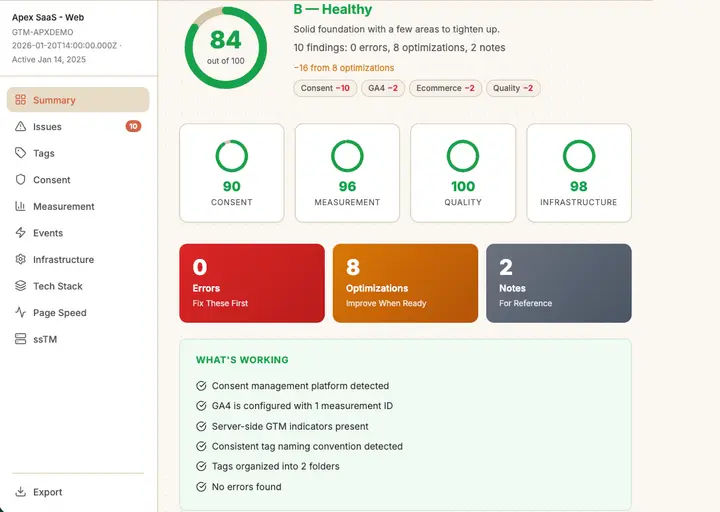
TagManifest does this work for you. Enter your URL or upload your container JSON export and it parses the code that comprises your container's functionality, returning a functional health score, a hygiene profile, and a prioritized work plan organized by effort. JSON uploads are processed in your browser and nothing leaves your machine. Combined with GTM's Preview mode for live validation, you can test, verify, and understand the true state of your container without guessing.
GTM resources for the learning curve
Inheriting a container doesn't mean winging it. GTM is a mature tool with a strong community of practitioners and educators who have been teaching this stuff for years. When I inherited that first container, these were the resources that helped me make sense of what I was looking at, and they're still the ones I point people to today:
- Simo Ahava is the definitive technical resource on GTM. Deep, rigorous posts on data layer architecture, custom triggers, consent mode, server-side tagging, and advanced implementation patterns. Google Developer Expert for GA and GTM. When you need to understand something complex, start here.
- Analytics Mania is where Julius Fedorovicius bridges the gap between "I know GTM exists" and "I can implement tracking confidently" with step-by-step tutorials that actually work. His GTM Masterclass is the most recommended structured course in the community.
- MeasureSchool is Julian Juenemann's YouTube channel and course platform, covering GTM and GA4 with clean, well-produced walkthroughs that are especially good if you're a visual learner who wants to see implementations done step by step.
- Measure Slack is an active community workspace where practitioners help each other with real implementation problems in real time. When you're stuck on something specific and need an answer from someone who's solved it before, this is where you ask.
- MeasureCamp hosts free unconference events globally, with attendee-driven sessions on measurement topics. It's the best way to connect with practitioners who've been through the same container inheritance problems you're facing.
The container you inherited wasn't documented, wasn't organized, and wasn't explained. The goal isn't perfection. It's inheritability: getting the container to a point where you, or the next person who opens it, can understand what's happening without doing archaeology. That starts with orientation, moves through evaluation, and ends with fixing things in an order that makes sense.
The container is probably fine. You just can't tell yet. Start there.
For context on what you're likely walking into: the median B2B SaaS container has 43 tags, 69% have paused tags that were never removed, and 4,432 Universal Analytics tags are still executing across the market three years after sunset.